
Chrome Extension Development Services
At Upstaff, we handle the entire development and deployment cycle, ensuring your extension is built for performance, compliance, and scalability. Let’s create something impactful together!
- 16%+ CAGR projected for Chrome extensions market through 2033
- 78% of our Chrome projects in 2025–2026 included AI / LLM features
- Average 4.8/5 client rating on Manifest V3 migration & AI-integrated extensions
- Reduced time-to-Chrome-Store by 40% thanks to our pre-vetted compliance expertise

Extension Architecture & Core Components
- Manifest File (
manifest.json) – Defines permissions, background scripts, and content scripts. - Content Scripts – Injected into web pages to modify content or extract data.
- Background Scripts – Handle persistent tasks like API calls or event listeners.
- Popup UI – The frontend interface for user interactions.
- Options Page – A settings page for users to configure the extension.
- Service Workers (Manifest v3) – Replace background scripts, improving security and performance.

Permissions & Security
- Chrome requires strict permission handling (e.g.,
storage,tabs,activeTab,scripting). - Manifest V3 enforces enhanced security by restricting remote code execution and using declarative APIs.
- Extensions must comply with Chrome Web Store’s policies, or they risk rejection or removal.

Key Features and Capabilities
- Automations & Web Scraping – Extracting data, filling forms, scheduling tasks.
- AI & NLP Integration – Chatbots, job parsing, keyword highlighting.
- API Integrations – Connecting to third-party services (e.g., CRM, blockchain, AI).
- Cross-Browser Support – Adapting for Edge, Firefox, Brave, and Safari.
TOP of 7 advantages of Chrome extension and plugin development services
1. Manifest V3 Security & Performance
Modern architecture, better privacy, no deprecated background pages
Modern architecture, better privacy, no deprecated background pages
2. Seamless AI & LLM Integration
Real-time summarization, scoring, classification directly in-browser
Real-time summarization, scoring, classification directly in-browser
3. Side Panel & Modern UI APIs
Rich, persistent interfaces without popup limitations.
Rich, persistent interfaces without popup limitations.
4. Low-friction Distribution
Publish to Chrome Web Store in days, no lengthy app review compared to mobile.
Publish to Chrome Web Store in days, no lengthy app review compared to mobile.
5. Cross-Browser Potential
Works on Edge, Brave, Opera with minimal changes
Works on Edge, Brave, Opera with minimal changes
6. High ROI for B2B Tools
Internal productivity boosters, lead enrichment, competitor monitoring
Internal productivity boosters, lead enrichment, competitor monitoring
7. Privacy-First Automation
Run powerful scripts locally without sending data to servers
Run powerful scripts locally without sending data to servers
Tech Stack for Chrome Extension Development
Frontend (User Interface & Interactions)
- HTML/CSS – For structuring and styling the extension’s popup, options page, and UI components.
- JavaScript (Vanilla JS, ES6+) – Core scripting for handling user interactions, DOM manipulation, and logic execution.
- React.js / Vue.js / Svelte – For building dynamic, interactive, and scalable UI components.
- Tailwind CSS / Bootstrap – For faster UI styling.
Backend (Data Handling & Processing)
- Node.js (Express, Fastify, Nest.js) – Backend for handling APIs, authentication, and data processing.
- Firebase / Supabase – Serverless backend options for authentication, database storage, and real-time updates.
- MongoDB / PostgreSQL / SQLite – Database options for storing user data or extension configurations.
- Redis – For caching and improving response time.
Chrome Extension-Specific APIs
Chrome Extension APIs – For interacting with browser tabs, storage, notifications, etc.chrome.runtime– Manages extension lifecycle events.chrome.storage– Stores data locally or in sync across devices.chrome.tabs– Manages and interacts with browser tabs.chrome.scripting– Injects and manages scripts dynamically (Manifest V3).chrome.notifications– Sends notifications to users.chrome.identity– Handles user authentication.
Hire Our Developers to Elevate Your Browsing Experience
Extension development
- Tailored Chrome extensions developed specifically for your business needs.
- Add new functionalities to existing extensions or boost their performance.
- Launch your extensions easily on the Chrome Web Store (CWS) to reach your audience.
Extension UI/UX design
- Develop intuitive interfaces that reduce friction and encourage user adoption.
- Design clear visual cues and interactions for a smooth browsing experience.
- Create responsive custom Chrome extensions that work seamlessly across different devices and platforms.
Extension optimization
- Optimize your code to ensure lightning-fast performance for an exceptional browsing experience.
- Implement advanced data handling and caching strategies to create a responsive user experience.
- Improve background scripts to ensure smooth and seamless extension functionality.
App extensions
- Develop user-friendly app extensions that seamlessly integrate with Gmail, Slack, and various popular tools.
- Create app extensions featuring dynamic user interface elements and customizable settings for enhanced usability.
- Build lightweight app extensions that provide a native app-like experience within the browser.
Extension support & maintenance
- Implement CI/CD pipeline integration to ensure your extension runs smoothly and efficiently.
- Maintain security through proactive patching in accordance with Chrome Web Store policies.
- Ensure continuous browser and API compatibility through regular code adaptations and updates.
Discover more about our Chrome extension development services:
Chrome Extensions:
Job Description
The Job Description Chrome extension will analyze job description content from a software development perspective, improve job description scoring, and match with relevant candidates, whether you are a novice or veteran in talent sourcing.Chrome Developer IMG slider
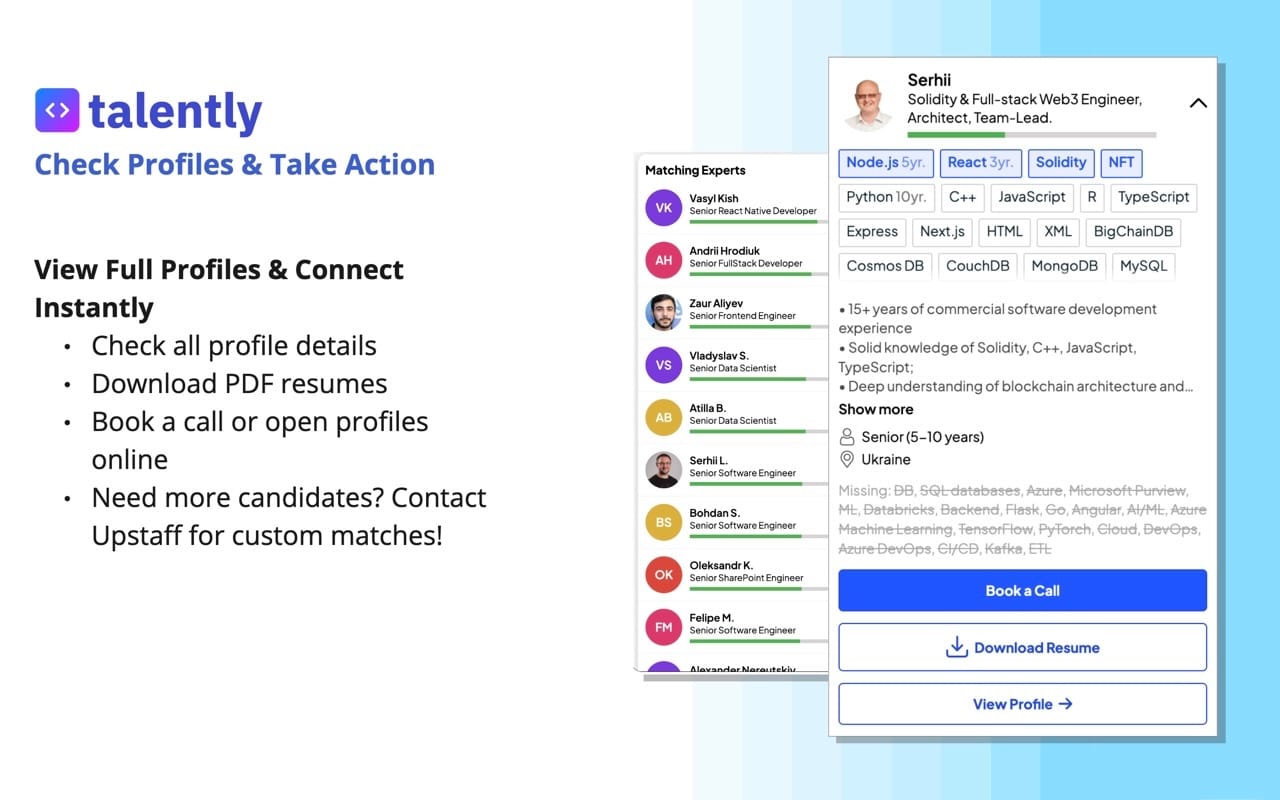
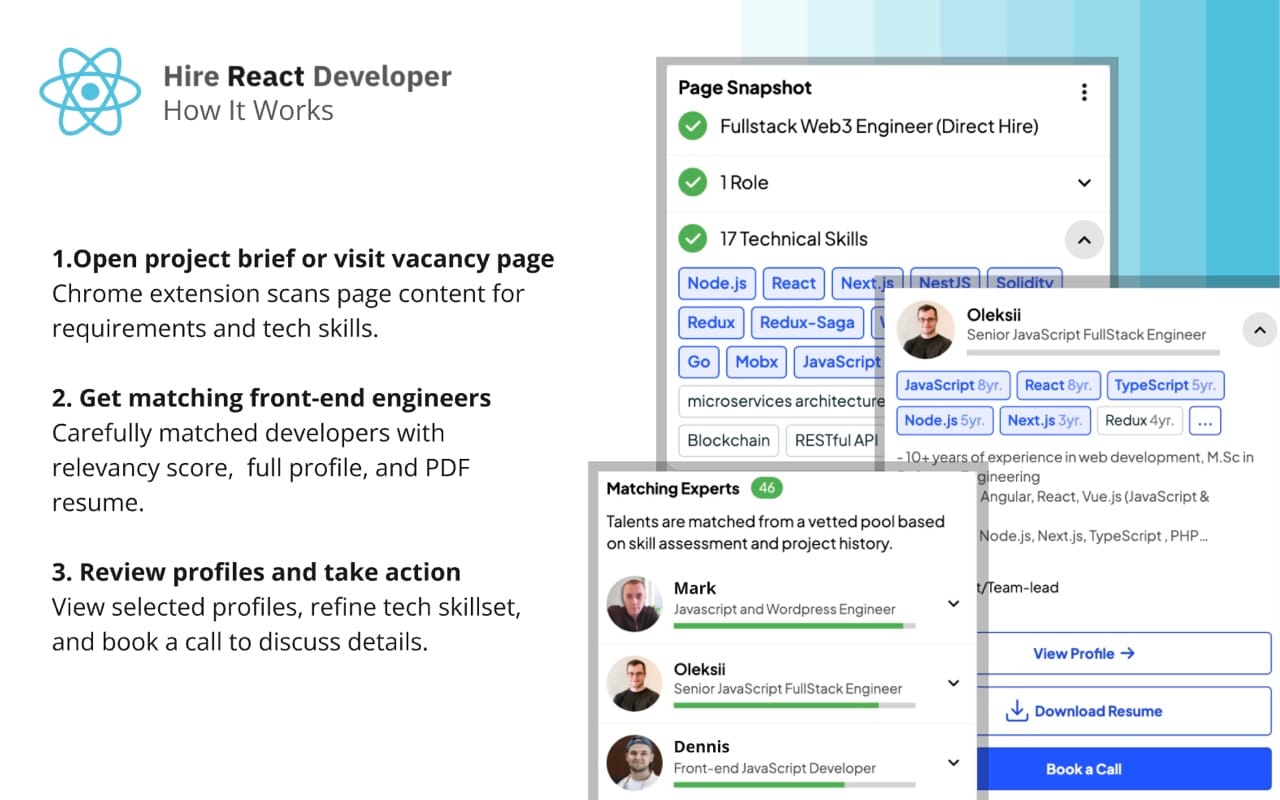
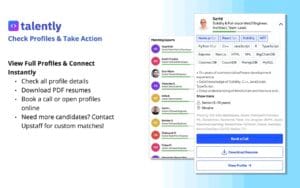

Features
- Job description Score
Improve and enrich job description to follow industry best practices. - Technical Skill Vocabulary: Classification and Popularity
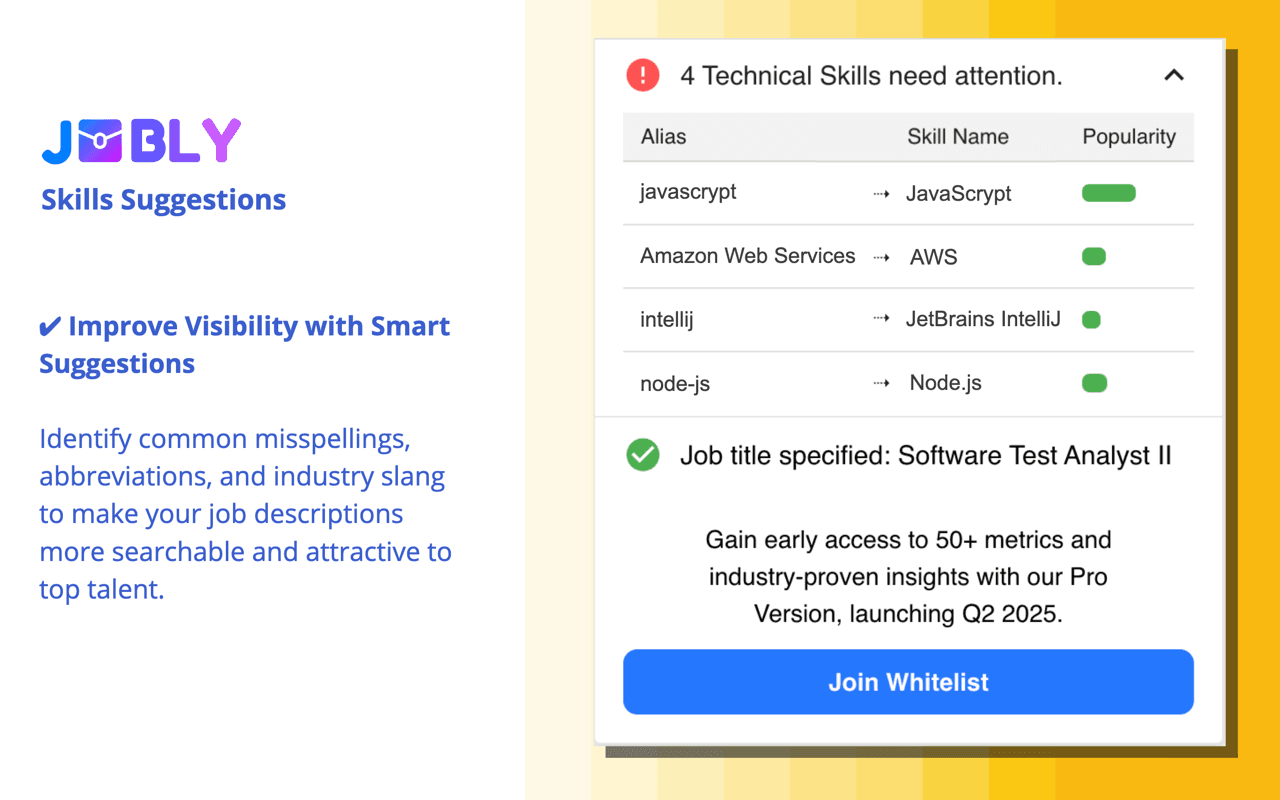
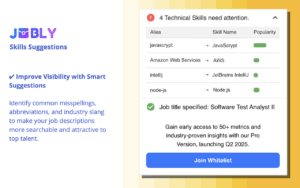
Highlight text in job descriptions and candidate profiles with 2,000+ technical skills, applications, frameworks, and libraries vocabulary. - Skills Suggestions
Suggestions for industry slang, misspellings, and abbreviations. Many times, knowing every keyword your candidate experiences, while searching and reading job descriptions can be quite enlightening. With this information, you can rewrite your content further to improve the visibility of industry professionals. - Best practices checklist
Make your job description stand out from industry requirements and the sourcing candidate checklist. - Clean & Simple User Interface
Get more done quickly with intuitive UI elements. Upstaff Job Assistant is designed to present the right information to you at the right time. The simple, but powerful user interface highlights important information about your jobs alongside the description. Using this information, you can improve your job description instantaneously. - Multi-platform support
Developed to support job description pages on widely used platforms such as Linkedin, Workable, Glassdoor, Indeed, Jobs Near You by Google, ZipRecruiter, and Upstaff.

Chrome Extensions
DevTools
JavaScript
Preact

React
TypeScript
Vue.js
Meet our Chrome extension development team

JavaScript 10yr.
React 10yr.
Node.js 7yr.
React Native 2yr.
Java
- 15+ years of experience in web development
- Front-End: JavaScript & TypeScript (React, Angular, Vue.js).
- Mobile: React Native.
- Back-End: Java (Spring Boot, JavaCV + FFmpeg for media processing), Node.js, Next.js, TypeScript, PHP.
- AWS Cloud infrastructure, Lambda/Serverless, SNS/SQS.
- Unit testing, integration testing, testing automation frameworks and tools
- M.Sc in Software Engineering, GAI, LLMs.
- Experience leading and mentoring a team of developers, including assigning tasks, providing guidance, and ensuring the team's success. Conducting assessments and interviews. Ability to motivate and train team members, resolve conflicts, and providing constructive feedback.

JavaScript 7yr.
WordPress 7yr.
Vue.js 5yr.
Chrome Extensions 1yr.
- 7 years of commercial experience with JavaScript, ECMAScript 6. Experience with responsive layout, web sites, mini applications in JS and SPA in Vue.js.
- 5 years with Vue.js framework (including Vue 3 core principles, Style Guide, Composition API, official documentation of the framework).
- Interacting with API endpoints and other web services.
- SOLID, DRY; UI Kit & Bootstrap, Unit tests (Cypress)
- Projects with WordPress
- Intermediary English

JavaScript 4yr.
Vue.js 2yr.
- 3 years of commercial experience, early projects since 2017. (Vue.Js, JavaScript, Chrome extensions)
- Has good knowledge of JavaScript, working with arrays, working with elements, sorting and data algorithms. Good understanding of HTML and CSS.
- Familiar with methodologies, principles, paradigms, and patterns in software development.
- Vuex for state management and Styled Components for styling.
- Rest APIs (Google, NovaPoshta) and Git for version control.
- Tailwind, Figma, and Webpack for UI
- Experienced in using Google Firebase, Cloud Firestore and Authentication.

Node.js 10yr.
• 15+ years JavaScript programming
• Over 10 years in Node.JS programming
• Familiar with React.js
• Experience building highly scalable distributed web applications and browser extensions
• Extensive experience with REST services
• Strong communication and cooperation skills
• Solid experience as a Backend developer
• Fluent in English, written and spoken
• long Term experience in remote work with USA and Europien companies
• Self-directed person, with proven ability to manage goals and deadlines effectively
Our 3 most common engagement models

Dedicated Chrome Extension Development Services Team
Upstaff is a Chrome extension development company that has dedicated front-end developers, architects, designers, and project managers for your extension project only. That ensures continuous innovation and close coordination in order to stay ahead in the competitive browser extensions space.

Time and Material
Upstaff’s time and material model works best Chrome extension development projects of an uncertain scope. This model of pay as you go guarantees clients only get paid for what they spend, and allows for adaption when the project changes.

Fixed Price Chrome Extension Development Model
With Upstaff fixed price pricing model, we have all of the details of the project scope and timing upfront, making crypto wallet development cost 100% transparent. This is the right solution for very well defined projects with fixed deliverables and fixed prices.
Our step-by-step cooperation process
Building a successful Chrome extension wallet takes time and planning. We have Chrome extension developers who ensure all solutions are functional and secure. Here’s a peek at the building process we have.
01
Clarifying Needs & Requirements
First, we define your project’s objectives, discuss the specific requirements of your Chrome Extension, and outline how it will solve real user or business problems — from productivity automation and AI-powered content analysis to workflow enhancements, data enrichment, real-time notifications, or secure browser tools. We then build a clear scope that ensures the extension is intuitive, compliant (Manifest V3), and delivers immediate value to your users.
02
Creating A Concept And A Full Strategy
Our team with years of browser extension and web development experience will design a perfect concept and strategy for your project and future goals. Our experts stay on top of the latest Chrome trends and APIs (side panel, offscreen documents, declarativeNetRequest, AI integrations, etc.) to adapt your extension to current market needs — whether it’s a productivity booster, developer tool, content analyzer, or enterprise automation solution.
03
Design & Development
Our designers and developers work together to create a secure, unique, and high-performance Chrome Extension that stands out. Using principles of intuitive UI (popup, options page, side panel), modern front-end stacks (React, Vue, TypeScript), and robust Manifest V3 architecture, we build your extension for maximum user engagement, seamless performance, and achievement of your business objectives.
04
Testing Stage & Internal Audit
We perform extensive testing and final proofing before launch to ensure your extension runs perfectly across Chrome versions and user scenarios. This includes functional testing, performance optimization, cross-browser compatibility checks (where relevant), edge-case handling, and a full security & compliance audit (permissions review, data privacy, no unnecessary access) to guarantee it meets Chrome Web Store policies and user trust standards.
05
Product Launch And Support
Through Upstaff, you can have your Chrome Extension launched on the Chrome Web Store (or distributed privately/enterprise-wide) and receive ongoing support to keep it running smoothly and evolving. We monitor for Chrome updates, fix bugs, add new features (e.g., new AI capabilities or API integrations), implement user feedback, and adapt to changing browser trends — ensuring your extension remains secure, relevant, and valuable over time.
06
Post-Launch Optimization & Scaling
After launch, we continue working with you to analyze usage data, user reviews, and performance metrics. We optimize load times, reduce resource usage, introduce advanced features (e.g., deeper LLM integrations or automation flows), and scale the extension as your needs grow — whether adding multi-user support, enterprise policies, or new monetization/compliance elements.
Case Studies
Upstaff, cryptocurrency wallet development company offers you custom wallet. Our expert team converts your concepts into secure and intuitive wallets using the highest quality development and consultancy solutions for your business needs.




Frequently Asked Questions
What key features and functionalities do you offer in Chrome Extension development?


We build custom Chrome Extensios with a wide range of capabilities tailored to your needs — from productivity tools and web scrapers to AI-powered automations, content analyzers, API integrations, real-time notifications, and secure data handling. Our extensions support Manifest V3 architecture, popup UIs, content scripts, background/service workers, storage/sync options, cross-browser compatibility (where needed), and advanced features like NLP processing or OAuth authentication. Our goal is to deliver fast, reliable, and user-friendly browser enhancements that solve real business problems.
How do you ensure security, privacy, and Chrome Web Store compliance in extensions?
Security and compliance are our top priorities. We strictly follow Manifest V3 requirements (no remote code execution, service workers instead of persistent backgrounds), implement least-privilege permissions, encrypt sensitive data, and conduct thorough security audits and testing. We also ensure full adherence to Chrome Web Store policies to avoid rejection or removal. All our vetted developers follow best practices for data privacy (GDPR-compliant where applicable) and build extensions that protect user information without unnecessary access.
Can Chrome extensions integrate AI, NLP, or external APIs effectively?
Absolutely — many of our extensions incorporate AI and machine learning features, such as content classification, sentiment analysis, job scoring, automated summaries, or real-time recommendations using models via APIs (OpenAI, Hugging Face, etc.). We handle secure API key management, rate limiting, error handling, and asynchronous processing to keep the extension responsive and reliable. We’ve delivered AI-driven tools like job description analyzers and productivity enhancers with strong performance.
What is the development process for a custom Chrome extension?
We start with a detailed consultation to understand your goals, target users, and required features. Then we move through architecture design (Manifest V3 planning, permissions, tech stack), UI/UX prototyping (popup, options page), core development (scripts, integrations), rigorous testing (cross-Chrome versions, edge cases), security review, and finally deployment to the Chrome Web Store (or private distribution). We collaborate closely at every stage and provide regular updates so the final extension perfectly matches your vision.
How long does it typically take to develop a Chrome extension?
Timelines depend on complexity. A simple popup-based extension with basic functionality can be ready in 2–6 weeks. Medium-complexity projects (AI integration, content scripts, API connections) usually take 1–3 months. Advanced extensions with heavy backend sync, real-time features, or multi-platform support may require 3–6 months. We provide a clear timeline estimate after the initial scope discussion, including milestones and buffer for Chrome Web Store review.
What are the pricing models for your Chrome extension development services?
We offer flexible and transparent models to fit different projects: fixed-price for well-defined scopes, time-and-materials for iterative or evolving work, and dedicated team options for long-term maintenance or multiple extensions. Rates are competitive (starting from our Eastern European vetted talent pool), and we always align pricing with your budget and timeline. Contact us with your project details for a personalized quote — no hidden fees.
Can you provide examples of successful Chrome extensions you’ve developed?
Yes — our portfolio includes dozens of extensions across productivity, recruitment, e-commerce, developer tools, and AI automation. Examples include AI-powered job description analyzers (with skill matching and scoring), content enhancers, web scrapers with ethical limits, and secure data-sync tools. We’re happy to share anonymized case studies, metrics (e.g., user adoption rates, performance improvements), or live demos upon request to demonstrate the quality and impact we deliver.
How do you ensure ongoing support and maintenance for Chrome extensions?
We provide full post-launch support for every extension we build. This includes monitoring for Chrome updates (Manifest V3 changes, API deprecations), bug fixes, security patches, performance optimizations, new feature additions, and compatibility testing across Chrome versions. We also handle Chrome Web Store updates, user feedback implementation, and analytics tracking to keep your extension relevant, secure, and highly rated over time.